> ## Documentation Index
> Fetch the complete documentation index at: https://aithing.dev/llms.txt
> Use this file to discover all available pages before exploring further.
# Managed Models
> Choose which AI you want to power your tasks
Connect to different large language models (brains) with your own API key—giving you full control over your AI capabilities.
## Managed Models `BYOK`
Managed models allow you to select AI models based on your needs using your **API key**, such as:
* **Fast and cost-effective** (Claude Haiku 3.5)
* **Balanced** (Claude Sonnet 4)
* **High intelligence** (Claude Opus 4.1)
To connect:
1. Get an API key from [Anthropic](https://docs.anthropic.com/claude/reference/getting-started-with-the-api)
2. Paste the key into the field that starts with `sk-ant-...`
This option gives you **full ownership and flexibility**, with no [AI Thing](https://aithing.dev) plan required.
## Model Settings
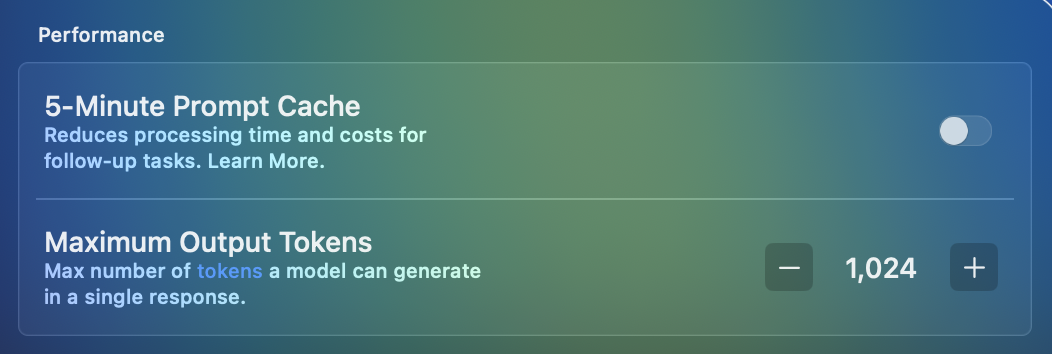
In **Settings → Preferences**, you can fine-tune how models behave:
 ### Prompt Cache
Reuses common parts of a prompt to speed up responses and lower costs during long or repetitive conversations.
For one-time or short queries, caching may actually be more expensive — it’s most useful when a conversation is expected to continue over many turns.
[Read more](https://docs.claude.com/en/docs/build-with-claude/prompt-caching).
### Output Tokens
Set the maximum length of responses. Useful for keeping outputs concise or allowing longer, more detailed answers.
### Prompt Cache
Reuses common parts of a prompt to speed up responses and lower costs during long or repetitive conversations.
For one-time or short queries, caching may actually be more expensive — it’s most useful when a conversation is expected to continue over many turns.
[Read more](https://docs.claude.com/en/docs/build-with-claude/prompt-caching).
### Output Tokens
Set the maximum length of responses. Useful for keeping outputs concise or allowing longer, more detailed answers.