> ## Documentation Index
> Fetch the complete documentation index at: https://aithing.dev/llms.txt
> Use this file to discover all available pages before exploring further.
# BYOK Models
> Use your own API keys to power AI Thing
Connect to powerful large language models using **your own API keys** — giving you full control, privacy, and flexibility. AI Thing never sends data to any model provider unless *you* choose to connect your own key.
Now you can **use multiple models** in the same conversation.
## BYOK: Bring Your Own Key
You choose the model. You bring the API key. **You stay in control.**\
AI Thing does **not** charge for usage — you pay only your provider, directly.
AI Thing now supports **Anthropic Claude**, **OpenAI GPT-5**, and **Google Gemini 2.5 / 3**, plus more coming soon.
***
## Supported Models
### **Anthropic Claude (4.5 series)**
* **claude-haiku** — Fast and cost-effective
* **claude-sonnet** — Balanced
* **claude-opus** — High intelligence
Create API Key: [https://console.anthropic.com/settings/keys](https://console.anthropic.com/settings/keys)
***
### **OpenAI GPT-5 Series**
* **gpt-5-nano** — Lightweight, cheap
* **gpt-5-mini** — Fast and capable
* **gpt-5.1** — Advanced reasoning and long-context
Create API Key: [https://platform.openai.com/settings/organization/api-keys](https://platform.openai.com/settings/organization/api-keys)
***
### **Google Gemini**
* **gemini-2.5-flash** — Extremely fast, low-cost
* **gemini-2.5-pro** — Strong all-purpose reasoning
* **gemini-3-pro** — Next-generation performance
Create API Key: [https://aistudio.google.com/app/api-keys](https://aistudio.google.com/app/api-keys)
***
## How to Connect
1. Get an API key from your chosen provider
2. Paste the key into the corresponding field inside **Settings → Models**
3. Select the default model you want AI Thing to use
Keys usually look like:
* Anthropic: `sk-ant-...`
* OpenAI: `sk-...`
* Google: `AIza...`
Your keys are stored **locally on your device**, never uploaded anywhere.
***
## Add Your Own Models
The open-source version of AI Thing includes a `Models.plist` file inside the project.\
You can add custom models by editing this file:
* Add a **model ID**, **display name**, and **provider type**
* Save the file and rebuild or relaunch
* Your model will appear in **Settings → Models** and can be used immediately
This makes it easy to plug in local, experimental, or self-hosted models with minimal setup.
***
## Model Settings
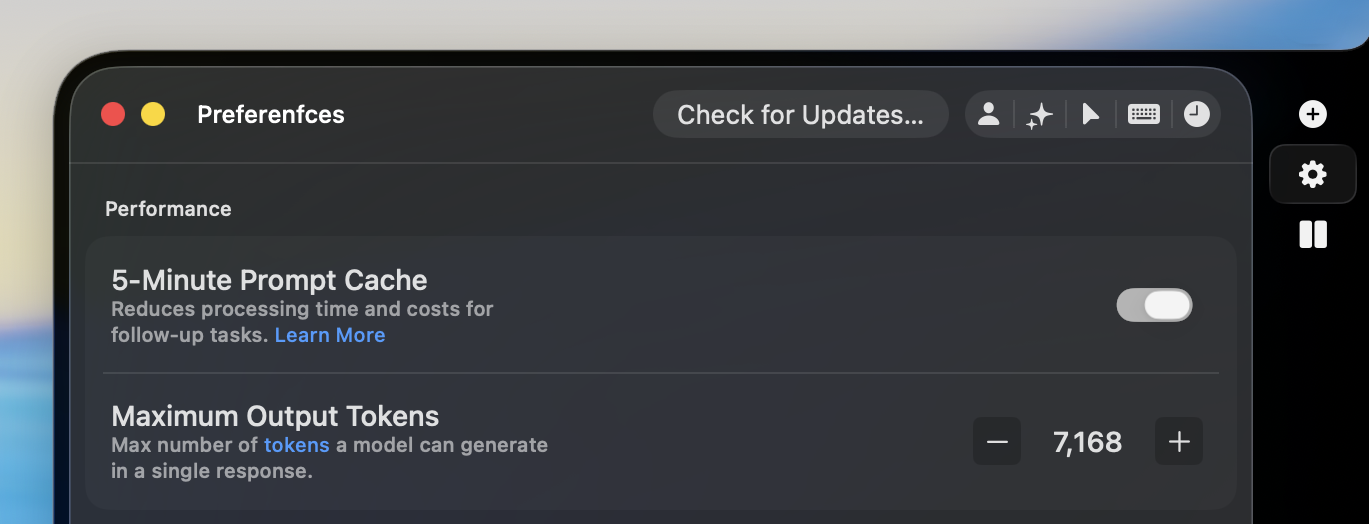
Fine-tune how each model behaves in **Settings → Preferences**:
 ### Prompt Cache
Reuses common parts of a prompt to speed up responses and reduce cost during long or multi-turn conversations.\
Best used when you're working in the same thread for a while.\
[Learn more](https://docs.claude.com/en/docs/build-with-claude/prompt-caching)
### Output Tokens
Set the maximum possible response length — helpful for keeping outputs concise or allowing long explanations.
***
Don’t want to manage API keys? Email us at **[help@aithing.dev](mailto:help@aithing.dev)**.
***
Have questions? Email us at **[help@aithing.dev](mailto:help@aithing.dev)**.
### Prompt Cache
Reuses common parts of a prompt to speed up responses and reduce cost during long or multi-turn conversations.\
Best used when you're working in the same thread for a while.\
[Learn more](https://docs.claude.com/en/docs/build-with-claude/prompt-caching)
### Output Tokens
Set the maximum possible response length — helpful for keeping outputs concise or allowing long explanations.
***
Don’t want to manage API keys? Email us at **[help@aithing.dev](mailto:help@aithing.dev)**.
***
Have questions? Email us at **[help@aithing.dev](mailto:help@aithing.dev)**.